
When Google Stops Seeing Your Site —
Robots.txt Error Fix Case Study
A hidden robots.txt block was keeping this website invisible to Google. Pages weren't indexing. Agencies kept trying surface fixes. We did a forensic audit, found the root cause — a server/CDN rule injecting policy text — and fixed it. Here's exactly what we did and what changed.

Technical SEO Overview
Pages weren't indexing. Three agencies had tried surface fixes — plugin changes, content rewrites, cache purges. Nothing worked. We treated it like a forensic SEO audit: find what Google actually sees, verify every layer, then fix with precision.
The root cause was a server/CDN rule injecting policy text into the robots.txt file — silently blocking Googlebot from crawling the entire site. Once identified and removed, crawlability was restored within 48 hours.
Who should read this: Founders, marketing leads, and SMB teams who have "done everything right" yet still see indexing errors, low impressions, or stagnant rankings in Google Search Console. The problem is almost never content. It's almost always a technical crawl block.
1. The Backstory — What Went Wrong
When a website stops showing up on Google, most business owners tweak keywords or install another SEO plugin. On GrowWithConsultants.com, on-page work looked solid — fresh content, clean schema, internal links improved. Yet critical pages weren't indexing.
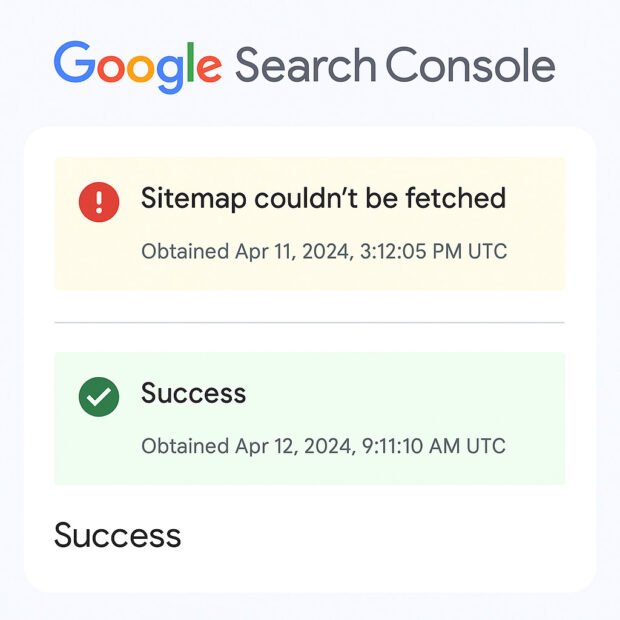
Google Search Console kept showing: "Sitemap couldn't be fetched." Speed, structured data, and internal links were already addressed. The block had to be deeper — at the crawl layer, not the content layer.
⚠️ The mistake most businesses make: Keep updating content and requesting indexing without first checking whether Google can even access the page. If Googlebot is blocked at robots.txt, no amount of content or backlinks will fix it.
2. What It Cost — Time, Money, Momentum
Despite consistent blogging, on-page fixes, and a clean sitemap setup, the site remained invisible in search results. Campaigns stalled. Decision-makers started doubting SEO investment itself.
Business impact: Lost search visibility → fewer inbound leads → sales pipeline slowdown. The cost was not just traffic — it was time and trust eroded over months of non-results.
Is Google Actually Seeing Your Website?
Most website owners don't know their robots.txt is broken until they check. Get a free SEO clarity call with Ameet — we'll diagnose your crawl and indexing health in 30 minutes.
3. The Technical Diagnosis — Verify Before Fixing
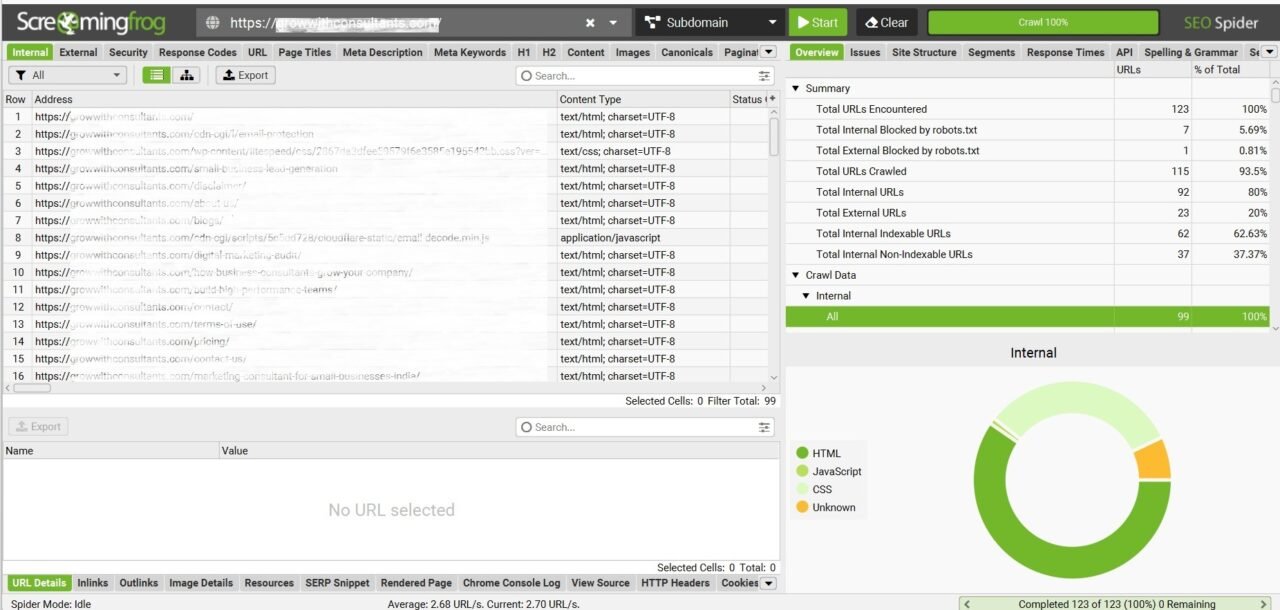
We approached this like a forensic audit. Tools assist, but the truth lives in live server responses. Each layer was verified independently before any fix was applied.
growwithconsultants.com/robots.txt directly in browser. Found unexpected policy text injected — not the clean Allow/Disallow format it should contain. Root cause identified.Finding: The robots.txt wasn't just "miswritten." It was actively overridden by a Cloudflare/server transform rule injecting policy text into the file's response. Googlebot was reading contaminated instructions — and stopping crawl across the entire domain.
4. The Fix — Precise and Surgical
Each step removes a single point of failure. No guesswork. No "let's try this." Verify → Fix → Verify again before moving to the next step.
Step 1 — Rebuild robots.txt (Clean)
Replace everything in the file with only the three lines Google needs:
Nothing else. No policy text. No extra directives. If you see anything beyond this structure — investigate before you publish.
Step 2 — Disable CDN/Server Policy Injection
In Cloudflare → Rules → Transform Rules: identify and disable any rule modifying text/plain responses or injecting content into robots.txt. This is the step most agencies miss entirely because they never inspect the CDN layer.
Step 3 — Regenerate Sitemap
In Rank Math → Sitemap settings → Regenerate sitemap. Then submit the fresh sitemap URL in Google Search Console under Sitemaps. Verify it returns a 200 status with no redirects.
Step 4 — Purge All Caches
Purge Cloudflare cache (Caching → Purge Everything) AND WordPress cache (WP Rocket, W3TC, or your cache plugin). Both layers must serve the clean file — a cached version of the contaminated robots.txt will undo the fix.
Step 5 — Verify in GSC Before Requesting Indexing
Use GSC → URL Inspection → Test Live URL. Only request indexing after the tool confirms "URL is available to Google." Requesting indexing of a still-blocked page wastes your indexing quota and delays recovery.
✅ Verification sequence: Browser check robots.txt → GSC Test Live URL → Screaming Frog re-crawl → confirm 0 "blocked by robots.txt" pages → then request indexing. This order matters.
5. The Results — Three Weeks Post-Fix
| Metric | Before Fix | After (3 Weeks) | Change |
|---|---|---|---|
| Indexed URLs | 25 | 90 | +260% |
| Impressions (GSC) | 1,300 | 4,700 | +261% |
| Click-Through Rate | 0.4% | 1.2% | +200% |
| Valid Sitemaps (GSC) | 1 | 8 | +700% |
| Crawlability | Blocked | Fully restored | 48 hrs |
Most SEO failures aren't keyword problems. They're system problems. Diagnose first, then optimise. If Google can't see your site, nothing else matters. — Ameet Mukherji, Technical SEO & Business Growth Consultant
How Google Understands Your Website
Understanding the sequence Googlebot follows is the foundation of any technical SEO diagnosis. When something breaks in this chain, everything downstream stops working — regardless of content quality or backlinks.
Blocked ✗ Crawler stops. No pages are seen. No content, no rankings, no traffic — regardless of quality.
6. Lessons for Business Owners
Go to yourwebsite.com/robots.txt right now. You should see only three types of lines: User-agent, Disallow, and Sitemap. If you see long policy paragraphs, random code blocks, or anything else — something is injecting content there. That could be a WordPress plugin, a Cloudflare rule, or your hosting provider's default configuration.
A contaminated robots.txt silently blocks Google from your entire site. It costs nothing to check — takes 30 seconds.
Inside Google Search Console, paste any URL and click Test Live. It tells you instantly: can Google access this page? Is it indexable? Is it mobile-friendly? Most SEOs skip this step and just keep requesting indexing blindly — which does nothing if the page is blocked at crawl level.
Rule: Verify first. Request indexing only after the tool confirms "URL is available to Google."
Screaming Frog SEO Spider mimics how Googlebot crawls your site. It surfaces: broken links, redirect chains, pages blocked by robots.txt, missing titles, duplicate meta descriptions, and more. Most technical issues are invisible in the WordPress dashboard — they only appear when you crawl from the outside, as Google does.
Redirect chains are a particularly silent revenue drain: each extra redirect step wastes crawl budget and slows indexing of your important pages.
Your sitemap should load in under 1 second with a clean 200 status. No redirects. No login wall. No pages listed that are set to noindex — that confuses Google about what you actually want indexed.
Check it monthly in GSC under Sitemaps. The "Couldn't be fetched" error is one of the most damaging — and most ignored — GSC warnings for small business websites.
This is the core truth in technical SEO. Most website owners keep doing — changing content, buying backlinks, switching themes — without diagnosing the root cause first. If your site isn't indexed because of a robots.txt block, writing 50 blog posts changes nothing. The same principle applies to business: systems problems look like sales problems until you diagnose the real layer.
Technical SEO Diagnostic Checklist
| Step | Tool | What to Check | Fix If Wrong |
|---|---|---|---|
| 1. Robots.txt | Browser | Only Allow/Disallow/Sitemap lines | Rebuild clean file; disable CDN injection |
| 2. Live URL Test | Google Search Console | Page accessible + indexable | Remove block before requesting index |
| 3. Site Crawl | Screaming Frog | Redirect chains, blocked pages, 404s | Fix chains; remove unnecessary redirects |
| 4. Sitemap | Browser + GSC | 200 status, no noindex pages listed | Regenerate + resubmit in GSC |
| 5. Cache | Cloudflare + WP plugin | Clean file serving after changes | Purge all cache layers after every fix |
| 6. Verify + Act | GSC + Analytics | Impressions + indexed URLs rising | Scale content only after crawl is clean |
7. Conclusion — Diagnose Before You Do
SEO isn't magic. It's method. If your pages aren't being indexed or your rankings are stuck despite good content and regular posting, audit your technical systems first — then optimise.
In this case: the diagnosis took hours, the fix took minutes, and the results came within 48 hours. Three agencies had spent months on the wrong layer. The lesson is not about SEO tools — it's about diagnosing before doing.
The same principle applies to every part of a business. Sales problems are often process problems. Hiring problems are often role-clarity problems. Website problems are often systems problems — not content problems.

Is a Hidden Block Killing Your SEO?
Most website owners don't know their robots.txt or sitemap is broken until they check. Book a free SEO clarity call — Ameet will diagnose your crawl health, indexing gaps, and what to fix first.

Frequently Asked Questions
Related Reading
Diagnose Before You Do.
Fix the System, Not the Symptom.
Whether it's your website crawl, your sales pipeline, or your team accountability — the root cause is almost never where you're looking. Book a free clarity call with Ameet.