
Website Not Showing on Google? Here's Why and How to Fix It
You have a website, but it's not showing on Google. It looks professional, your services are listed and your phone number is there. You may even be posting blogs every month.
Yet when someone in Delhi, Pune or Coimbatore searches for what you sell, your business is nowhere to be seen.
This is when most business owners ask:
“Why is my website not showing on Google?”
The answer is not simply “you need more SEO.”
Before Google shows your website to someone, it first needs to find it, understand it, match it with the search, assess its usefulness and trust, and then decide whether it deserves visibility.
Let us understand this in simple business language. First, though, do a quick check.
5-Minute Check: Is Your Website Showing on Google?
Before spending money on SEO, find out where the problem is. You don't need any technical skill for this.
- Do a site: search. Type site:yourwebsite.com (or .in / .co.in) into Google. If no pages appear, Google has not indexed your website yet.
- Open Google Search Console. It's free. Use the URL Inspection tool on your home page and main service page. It tells you if the page is indexed, and if not, why. Set up Google Search Console.
- Look for a "noindex" setting. On WordPress, go to Settings → Reading and make sure "Discourage search engines from indexing this site" is not ticked. Developers often switch it on while building the site and forget to switch it off.
- Submit your sitemap. If you use Yoast, it is usually yourwebsite.com/sitemap_index.xml. Add it in Search Console under Sitemaps.
- Set up your Google Business Profile. For "near me" and city searches, the map listing often shows above the websites. A complete profile with genuine reviews matters a lot for local businesses in India.
If your site is brand new, give Google a few days to a few weeks. However, if it's been months and nothing shows, something is blocking it. The rest of this article explains how Google decides what to show.
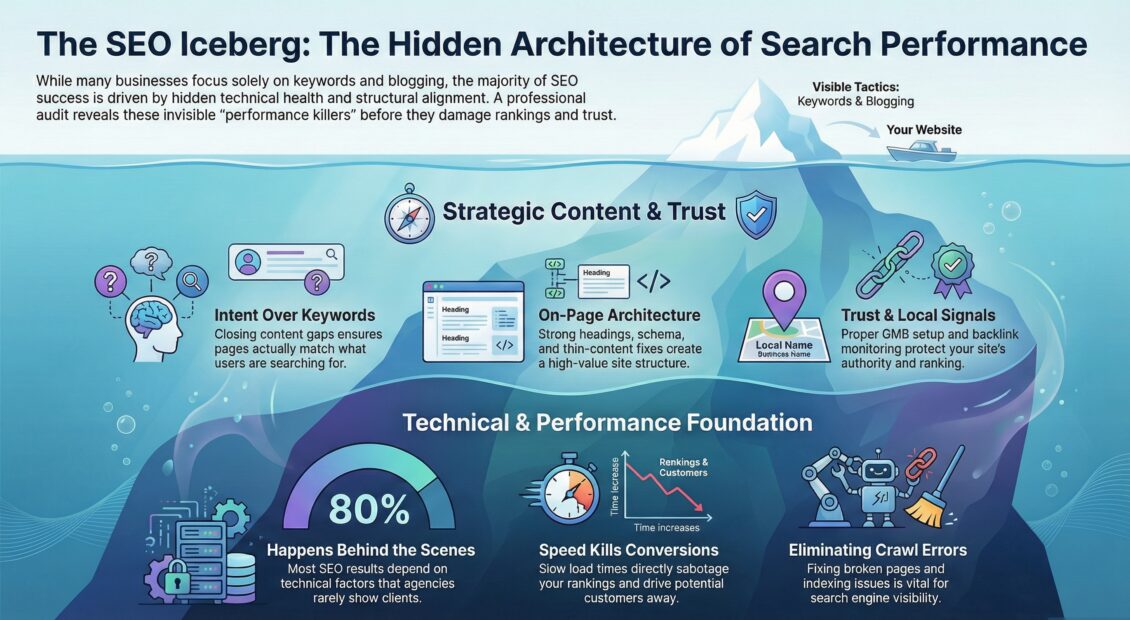
Having a Website Doesn't Mean It's Visible on Google
Think about opening a shop.
You may have good products, attractive interiors and helpful staff. But if the shop is hidden in a lane with no signboard, no directions and nobody talking about it, how will customers find you?
A website can face the same problem.
Being online means your website exists. Being visible means Google understands when and why it should show your website to a potential customer.
That is where SEO actually begins.
1.Google First Needs to Find Your Website
Google uses automated programs, commonly called crawlers, to discover pages on the internet.
In simple language, Google first asks: “Does this page exist, and can I access it?”
Google can discover pages through links, sitemaps and other pages it already knows.
If important pages are blocked, badly connected, broken or difficult for Google to access, you may have a visibility problem before Google even evaluates your content.
This stage is called crawling.
A practical example is our robots.txt crawlability case study, where a technical issue prevented Google from properly accessing important pages.
2.Google Then Tries to Understand Your Page
Finding a webpage is only the beginning.
Google then processes the page and tries to understand what it is about. This is commonly called indexing.
“Welcome to ABC Solutions. We provide innovative, reliable and customer-focused solutions to businesses.”
“We help manufacturing SMEs improve sales, build accountable teams, create SOPs and reduce owner dependency.”
What exactly does ABC Solutions do? Software? Accounting? Recruitment? Construction? Consulting? Neither the customer nor Google gets a clear answer. In the second version, the subject is immediately clearer.
This is why your page title, main heading, subheadings, content, images, internal links and overall page structure matter.
Your website needs clarity before creativity.
3.Google Tries to Understand Search Intent
Suppose three people search Google:
All three searches are about SEO, but the intention is different. This is called search intent.
In India, many buyers also search in Hinglish, for example "website Google pe kaise laaye". If your customers search like this, it's fine for your content to use their words too.
A page can contain the right keyword and still struggle if it answers the wrong question. Good SEO connects:
- What the customer searches
- Why they are searching
- Which page answers that requirement
4.Google Checks Whether Your Page Is Relevant
Suppose someone searches: “Business growth consultant for manufacturing company”
Google now has to choose from many possible pages. Your website should make it easy to understand that your page genuinely addresses that requirement.
That does not mean repeating the same keyword again and again. Instead, the page should naturally explain:
- What problem you solve
- Who you help
- What service you provide
- How your process works
- What experience or proof you have
- What the visitor should do next
The customer should finish the page thinking: “Yes, this business understands my problem.”
5.Your Title, H1 and Meta Description Help, but They Are Not Magic Buttons
Business owners often hear:
- Put the keyword in the title
- Put it in the H1
- Write a meta description
These things are useful, but they are only parts of a larger picture.
The SEO title should explain the page clearly. The H1 introduces the subject, while subheadings make the content easy to follow. Most importantly, the content itself must answer what the person searched for.
Your meta description can help explain the page in search results, but it should not be treated as a shortcut to higher rankings.
6.Google Wants Helpful Content, Not Content Written Only for Google
This is where many small-business websites waste money.
Blogs are published every month simply because someone said, “Google wants fresh content.” But the better question is:
“Did this page genuinely help our potential customer?”
“We are a leading organisation committed to offering innovative, world-class solutions.”
“We help owner-managed businesses identify why leads are not converting, where sales follow-up is breaking and what needs to change in the sales process.”
Good SEO content should be written for people first. Google says the same in its own guide to helpful content.
7.Google Also Looks for Trust
Imagine finding two consultants through Google.
The first website says, “We are India’s best business consultants.” But there are no real people shown, no case examples, no clear experience and no proof.
The second website explains who the consultant is, their experience, the businesses they have worked with, client feedback and how the engagement works.
Which one would you trust? Probably the second.
You may hear the term E-E-A-T in SEO:
- EExperience
- EExpertise
- AAuthoritativeness
- TTrustworthiness
For a business owner, the simpler question is: “What proof have we given that we genuinely know this subject and can be trusted?”
That proof may come from real experience, case studies, reviews, team profiles, credentials, original insights, business details and genuine external references.
For Indian businesses, a few simple trust signals go a long way: your full office address, GST number, real photos of your team, Google reviews, and a phone and WhatsApp number that someone actually answers.
Do not just claim expertise. Demonstrate it.
8.Website Experience Matters Too
Now imagine Google sends someone to your website. In India, that person is most likely on a phone, often on a patchy mobile connection.
The page loads slowly. The text is difficult to read on mobile. A pop-up covers the screen. The visitor cannot find the phone number. Buttons do not work properly.
What happens? The visitor leaves.
That is why website visibility cannot be separated from website experience. Your website should be:
- Mobile-friendly
- Fast enough to use comfortably
- Secure
- Easy to navigate
- Easy to read
- Clear about the next action
If you are unsure whether your website structure, messaging and conversion flow are helping or hurting visibility, a website consultation can help identify the gaps.
Google Search Is No Longer Just “10 Blue Links”
Google can present information in different ways depending on the search. A user may see:
- Traditional organic listings
- Google Maps and local results (very important for city searches)
- Images
- Videos
- Featured information
- Sitelinks
- Rich results
- AI-powered search experiences
So businesses should stop asking only “What position are we ranking at?” A better question is:
“When our potential customer searches, where and how can our business become visible?”
The Google Visibility Journey in Simple Words
- A customer searches
- Google finds your page
- Its crawler reads the page
- The page is added to Google's index
- Search intent is matched
- Relevance is checked
- Quality and trust are judged
- Page experience is considered
- Google decides whether and where to show it
- The customer clicks, trusts you, enquires and, hopefully, buys
Visibility Is Only One Part of Business Growth
Suppose your website traffic doubles. That sounds good.
But enquiries remain the same. Or enquiries increase, but nobody follows them up properly. Or customers visit the website but cannot understand why they should choose you.
Then more traffic will not fix the real business problem.
This is why at Grow With Consultants we look beyond rankings.
A proper digital marketing audit should not only ask how many visitors came to your website. It should also examine what those visitors did after arriving.
Similarly, effective SEO consulting services for small businesses should connect keywords with customer intent and business outcomes, not just ranking reports.
The actual business journey is:
- Search
- Visibility
- Visit
- Trust
- Lead
- Follow-up
- Sale
- Repeat
- Referral
Why Your Website May Not Be Showing on Google
If your website is struggling for visibility, the problem may be one or more of the following:
- Google is not discovering important pages properly
- Some pages are not being indexed
- The page does not clearly explain its subject
- You are targeting the wrong search intent
- The content is too generic
- Your competitors have stronger pages
- The website lacks enough trust signals
- The website experience is weak
- Your internal linking is poor
- Your technical SEO needs attention
- A "noindex" tag or robots.txt rule is blocking Google
- You have no Google Business Profile for local searches
“Add more keywords.”
“Find where the visibility journey is breaking.”
If you are paying an external agency but are unsure whether the work is improving the business, this guide on how to evaluate an SEO agency can help you ask better questions.
Website Indexed but Still Not Showing on Google's First Page?
This is different from not being indexed.
If Google has indexed your page but it is still not appearing prominently for the searches you want, the issue may be relevance, search intent, content quality, competition, authority, internal linking or the overall usefulness of the page.
Being indexed means Google knows the page exists.
It does not mean Google has decided that your page deserves a top position.
A Simple Test for Every Business Owner
Open one important service page on your website. Now forget that you own the company. Imagine you are a potential customer seeing it for the first time.
- Within five seconds, can you tell what the company does?
- Is it clear who the service is for?
- Does the page solve a real customer problem?
- Can you see proof of experience?
- Is the next step easy to find?
- Would Google know which searches this page should appear for?
If the answers are unclear, that page needs work.
Frequently Asked Questions
Why is my website not showing on Google?
There can be several reasons. Google may not have discovered or indexed the page properly, the page may not match the search intent, the content may not be competitive enough, or technical and website-quality issues may be limiting visibility.
Does putting keywords on my website make it rank?
Keywords help explain the subject of a page, but simply adding or repeating keywords does not guarantee rankings. The page also needs to satisfy search intent, provide useful information and compete effectively with other relevant pages.
Is the meta description a Google ranking factor?
A useful meta description can help explain your page to searchers, but it should not be treated as a ranking shortcut. Google may also generate the search snippet from the actual content on the page.
What is the difference between crawling and indexing?
Crawling is how Google discovers and accesses web pages. Indexing is part of how Google processes and understands those pages so they may become eligible to appear in Search.
What is E-E-A-T in SEO?
E-E-A-T stands for Experience, Expertise, Authoritativeness and Trustworthiness. For a business owner, the practical lesson is simple: show real evidence that you understand your subject and that customers can trust your business.
How can I check why my website is not visible?
Start with Google Search Console and your important service pages. Check whether Google can index the pages, what searches are generating impressions, whether the content matches those searches and whether technical or content gaps need correction.
How long does Google take to index a new website?
Usually a few days to a few weeks. Submitting your sitemap and using Request Indexing in Google Search Console can help Google find it sooner. Even so, it doesn't guarantee indexing or a good ranking.
Why does my business show on Google Maps but not in normal search results?
The map results come from your Google Business Profile, while the normal results come from your website. So a profile with good reviews can show in the map pack even when the website itself is weak. To appear in both, your website needs clear service pages for the cities or areas you serve.
Final Thought
A website does not become visible simply because it has been published. Google first needs to:
Find you. Understand you. Match you. Trust you. And believe your page is useful to the searcher.
But even that is not the finish line. Your customer still needs to visit, trust, enquire and eventually buy.
So instead of asking only “Do we have a website?”, ask:
“Can Google understand our website well enough to connect us with the customer who needs us?”
That is the real purpose of search visibility.